
Akif T.
Monday, September 21, 2026 | 3 minutes
Blazor Fluent UI .NET 10 DataGrid with Search Paging

Blazor Fluent UI .NET 10 DataGrid with Search Paging
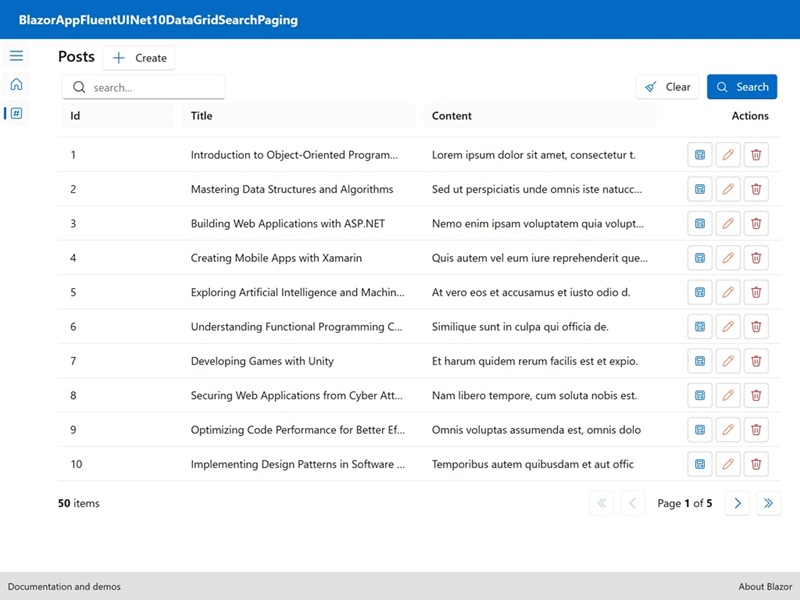
.NET 10: .NET 10 introduces several enhancements, including performance improvements, new APIs, and better support for cloud-native applications. The integration of JSON schema extraction in .NET 10 is a significant feature that aids in data validation and API documentation.
Blazor: Blazor is a web framework that allows developers to build interactive web applications using C# instead of JavaScript. It leverages the power of .NET to create rich client-side applications that can run in the browser via WebAssembly or on the server.
Fluent UI Blazor: Fluent UI Blazor is a set of components that implement Microsoft’s Fluent Design System for Blazor applications. It provides a consistent and modern user interface, enhancing the overall user experience.
DataGrid: A component that displays data in a tabular format, allowing for sorting, filtering, and pagination.
Pagination: A technique to divide a large dataset into smaller, manageable chunks, improving performance and user experience.
Index.razor
@page "/BlogPost"

@inject IDialogService DialogService

<PageTitle>Posts</PageTitle>

<FluentStack Orientation="Orientation.Horizontal">
    <FluentLabel Typo="Typography.H4">Posts</FluentLabel>
    <FluentButton OnClick="NavigatetoCreate" IconStart="@(new Icons.Regular.Size20.Add())">Create</FluentButton>
</FluentStack>

<FluentGrid Spacing="1" Justify="JustifyContent.FlexStart" Style="padding: 5px;">
    <FluentGridItem xs="12" sm="6" md="6">
        <FluentStack Orientation="Orientation.Horizontal" HorizontalAlignment="HorizontalAlignment.Start" VerticalAlignment="VerticalAlignment.Center">
            <FluentTextField @bind-Value=_stateFilter Placeholder="search...">
                <FluentIcon Value="@(new Icons.Regular.Size20.Search())" Color="@Color.Neutral" Slot="start" />
            </FluentTextField>
        </FluentStack>
    </FluentGridItem>
    <FluentGridItem xs="12" sm="6" md="6">
        <FluentStack Orientation="Orientation.Horizontal" HorizontalAlignment="HorizontalAlignment.End" VerticalAlignment="VerticalAlignment.Center">
            <FluentButton IconStart="@(new Icons.Regular.Size16.Broom())" Disabled="loadingDataGrid" OnClick="ClearFilters">Clear</FluentButton>
            <FluentButton IconStart="@(new Icons.Regular.Size16.Search())" Appearance="Appearance.Accent" Loading="loadingDataGrid" OnClick="DataGridRefreshDataAsync">Search</FluentButton>
        </FluentStack>
    </FluentGridItem>
</FluentGrid>

<FluentDataGrid @ref="dataGrid" RefreshItems="LoadItems" Id="blogpostsgrid" Items="@blogposts" GridTemplateColumns="1fr 2fr 2fr 1fr" RowSize="DataGridRowSize.Medium" TGridItem="BlogPostViewModel" Loading="loadingDataGrid" Pagination="paginationState">
    <LoadingContent>
        <FluentLabel>Loading...</FluentLabel>
    </LoadingContent>
    <EmptyContent>
        <p>No item.</p>
    </EmptyContent>
    <ChildContent>
        <PropertyColumn Title="Id" Property="@(c => c!.Id)" Sortable="true" Align="Align.Start" />
        <PropertyColumn Title="Title" Property="@(c => c!.Title)" Sortable="true" Align="Align.Start" />
        <PropertyColumn Title="Content" Property="@(c => c!.Content)" Sortable="true" Align="Align.Start" />
        <TemplateColumn Title="Actions" Align="Align.End">
            <FluentButton OnClick="() => ButtonShowDialog(context.Id)" Appearance="Appearance.Outline">
                <FluentIcon Value="@(new Icons.Regular.Size16.ContentView())" Color="@Color.Accent" />
            </FluentButton>
            <FluentButton OnClick="() => NavigatetoEdit(context.Id)" Appearance="Appearance.Outline">
                <FluentIcon Value="@(new Icons.Regular.Size16.Edit())" Color="@Color.Warning" />
            </FluentButton>
            <FluentButton OnClick="() => NavigatetoDelete(context.Id)" Appearance="Appearance.Outline">
                <FluentIcon Value="@(new Icons.Regular.Size16.Delete())" Color="@Color.Error" />
            </FluentButton>
        </TemplateColumn>
    </ChildContent>
</FluentDataGrid>
<FluentPaginator State="paginationState" />


@code {

    string? _stateFilter = "";

    private bool loadingDataGrid = false;
    private PaginationState paginationState = new PaginationState { ItemsPerPage = 10 };
    private FluentDataGrid<BlogPostViewModel> dataGrid = default!;
    private IQueryable<BlogPostViewModel>? blogposts = null;

    private async Task LoadItems(GridItemsProviderRequest<BlogPostViewModel> req)
    {
        loadingDataGrid = true;
        await InvokeAsync(StateHasChanged);

        int? limit = req.Count;
        int? skip = req.StartIndex;

        string? filter = null;
        if (!string.IsNullOrWhiteSpace(_stateFilter))  // Title.Contains(\"AAAA\")
            filter = $"Title.Contains(\"{_stateFilter}\")";

        string? orderby = null;
        var s = req.GetSortByProperties().FirstOrDefault();
        if (req.SortByColumn != null && !string.IsNullOrEmpty(s.PropertyName))  // Title Descending // Title Ascending // Title desc // Title asc // multisort Title asc, Content desc
            orderby = $"{s.PropertyName} {(s.Direction == SortDirection.Ascending ? "asc" : "desc")}";

        var response = await BlogPostService.GetBlogPostsAsync(filter: filter, top: limit, skip: skip, orderby: orderby, count: true);
        var blogPostList = response.Result;
        if (blogPostList is null)
            return;

        var notesViewModel = Mapper.Map<IEnumerable<BlogPost>, IEnumerable<BlogPostViewModel>>(response.Result);
        blogposts = notesViewModel.AsQueryable();
        await paginationState.SetTotalItemCountAsync(response.TotalCount);

        loadingDataGrid = false;
        await InvokeAsync(StateHasChanged);
    }

    public async Task ClearFilters()
    {
        _stateFilter = null;
        await dataGrid.RefreshDataAsync(true);
    }

    public async Task DataGridRefreshDataAsync()
    {
        await dataGrid.RefreshDataAsync(true);
    }

    private async Task ButtonShowDialog(int id)
    {
        var dataContent = new Pages.BlogPost.DialogDetail.BlogPostContent { Id = id };
        var dialog = await DialogService.ShowDialogAsync<Pages.BlogPost.DialogDetail>(dataContent, new DialogParameters()
        {
            DialogType = DialogType.Dialog,
            Title = $"Show",
            PreventScroll = true,
        });
        var result = await dialog.Result;
        if (!result.Cancelled && result.Data != null)
        {
        }
    }

    private void NavigatetoCreate() => NavigationManager.NavigateTo("/BlogPost/Create");
    private void NavigatetoDetail(int id) => NavigationManager.NavigateTo($"/BlogPost/Detail/{id}");
    private void NavigatetoEdit(int id) => NavigationManager.NavigateTo($"/BlogPost/Edit/{id}");
    private void NavigatetoDelete(int id) => NavigationManager.NavigateTo($"/BlogPost/Delete/{id}");

}
FluentTextField binds to _stateFilter, allowing users to input search criteria. Search icon is displayed at the start of the input field. Clear button resets the search filter, while Search button triggers the data refresh based on the input. FluentDataGrid is configured to display blog posts with properties for ID, title, and content. Each column is sortable. TemplateColumn includes action buttons for viewing, editing, and deleting posts, enhancing user interaction. FluentPaginator component manages the pagination state, allowing users to navigate through the pages of blog posts.
Source
Full source code is available at this repository in GitHub:
https://github.com/akifmt/DotNetCoding/tree/main/src/BlazorAppFluentUINet10DataGridSearchPaging