
Akif T.
Thursday, July 30, 2026 | 3 minutes
Blazor .NET 10 Extract JSON schema

Blazor .NET 10 Extract JSON schema
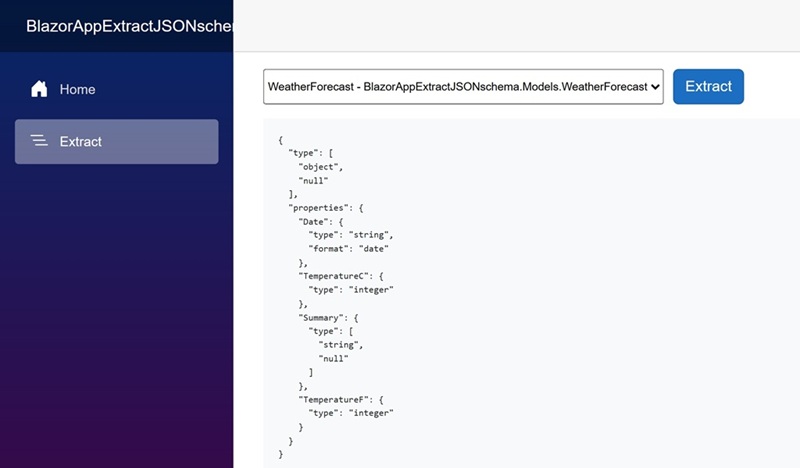
.NET 10: .NET 10 introduces several enhancements, including performance improvements, new APIs, and better support for cloud-native applications. The integration of JSON schema extraction in .NET 10 is a significant feature that aids in data validation and API documentation.
Blazor: Blazor is a web framework that allows developers to build interactive web applications using C# instead of JavaScript. It leverages the power of .NET to create rich client-side applications that can run in the browser via WebAssembly or on the server.
JSON Schema: JSON Schema is a powerful tool for validating the structure of JSON data. It defines the expected format, types, and constraints of JSON objects, ensuring that the data adheres to a specified structure. This is particularly useful in API development, where consistent data formats are crucial for interoperability.
Models
namespace BlazorAppExtractJSONschema.Models;

public class WeatherForecast
{
    public DateOnly Date { get; set; }
    public int TemperatureC { get; set; }
    public string? Summary { get; set; }
    public int TemperatureF => 32 + (int)(TemperatureC / 0.5556);
}
namespace BlazorAppExtractJSONschema.Models;

public class BlogPost
{
    public int Id { get; set; }
    public string Title { get; set; } = string.Empty;
    public string Content { get; set; } = string.Empty;
}
WeatherForecast and BlogPost classes exemplify how to create structured data models in a Blazor .NET 10 application. By defining properties and utilizing calculated fields, these models not only facilitate data management but also enhance the application’s ability to interact with JSON data.
Extract.razor
@page "/extract"

<PageTitle>PageTitle</PageTitle>

<div style="display: flex;gap: 10px;margin-bottom: 15px;">
    <select @bind=@selectedName style="max-width: 480px;font-size: 12px;">
        <option value="" disabled selected>select...</option>
        @if (definedTypes is not null)
        {
            @foreach (var item in definedTypes)
            {
                <option value="@item.Name">@($"{item.Name} - {item.FullName}")</option>
            }
        }
    </select>

    <button class="btn btn-primary" @onclick="ButtonExtractClick">Extract</button>
</div>

<div style="font-size:0.7em">
    <pre class="bg-light p-3"><code>
        @extracted
    </code></pre>
</div>

@code {

    private Type[]? definedTypes;
    private string selectedName = string.Empty;
    private string extracted = string.Empty;

    protected override async Task OnInitializedAsync()
    {
        string typeFolderinAsse = $"{AppDomain.CurrentDomain.FriendlyName}.Models";
        var typesinModels = AppDomain.CurrentDomain.GetAssemblies().SelectMany(x => x.GetTypes())
            .Where(x => x != null && x.Namespace != null && x.Namespace.StartsWith(typeFolderinAsse));
        definedTypes = typesinModels.ToArray();
    }


    private void ButtonExtractClick()
    {
        if (definedTypes is null) return;
        var selectedType = definedTypes.FirstOrDefault(x => x.Name == selectedName);
        if (selectedType is null) return;

        JsonNode schema = SimpleExtraction(selectedType); // 1
        // JsonNode schema = CustomExtraction(selectedType); // 2

        extracted = schema.ToString();
    }

    // simpleextraction: 1
    private JsonNode SimpleExtraction(Type type) => JsonSerializerOptions.Default.GetJsonSchemaAsNode(type);

    // customextraction: 2
    private JsonNode CustomExtraction(Type type)
    {
        JsonSerializerOptions options = new(JsonSerializerOptions.Default)
        {
            WriteIndented = false,
            PropertyNamingPolicy = JsonNamingPolicy.CamelCase,
            NumberHandling = JsonNumberHandling.WriteAsString,
            UnmappedMemberHandling = JsonUnmappedMemberHandling.Disallow,
        };
        JsonNode schema = options.GetJsonSchemaAsNode(type);
        return schema;
    }

}
OnInitializedAsync, retrieves all types from the application’s assembly that belong to a specific namespace and stores them in the definedTypes array. ButtonExtractClick, checks if a type has been selected and then calls either SimpleExtraction or CustomExtraction to generate the JSON schema. SimpleExtraction, uses the default JSON serializer options to extract the schema from the selected type. CustomExtraction, allows for more control over the JSON serialization process. It customizes the serializer options, such as naming policies and handling of unmapped members, providing a tailored schema output.
By utilizing both SimpleExtraction and CustomExtraction, developers can choose the method that best fits their needs. This flexibility, combined with the ease of use provided by the Blazor framework, makes it an excellent choice for building interactive web applications that require JSON schema validation.
Source
Full source code is available at this repository in GitHub:
https://github.com/akifmt/DotNetCoding/tree/main/src/BlazorAppExtractJSONschema